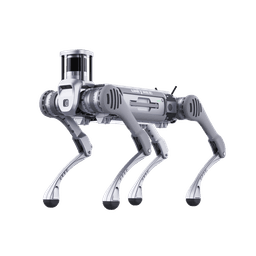
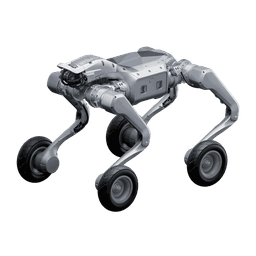
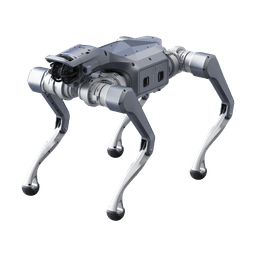
What is a thermal camera robot dog used for?
A thermal camera turns heat differences into an image. It needs no light, so the robot's work is not limited to daytime.
- Night recon and patrol: Detecting people and vehicles in unlit areas.
- Search and rescue: Finding survivors in rubble, forest and smoke. See the search and rescue robot guide.
- Plant inspection: Overheating points on panels, motors, bearings, pipes and transformers.
- Post-fire checks: Monitoring heat sources in areas too dark or smoky to enter.
In these jobs the robot makes the first observation before a person enters the hazard zone. For security use, see our security patrol robot guide.
What features does a dual-sensor thermal gimbal offer?
The dual-sensor thermal gimbal in Unitree's industrial packages carries two cameras in one housing. The values below are manufacturer-stated.
- Thermal sensor: 640×512 resolution.
- Visible camera: 4 MP.
- Zoom: 32× optical and 16× digital.
- Temperature range: -20 to 550 °C measurement.
- Measurement accuracy: ±2 °C or ±2%.
Some dealer pages list 25× optical zoom for a similar gimbal, so variants can differ. Frame rate, field of view, IP rating, stabilization and video protocol are not published on the manufacturer page. We confirm these in writing with the manufacturer per project.
For package options, see the Unitree industrial packages guide.
What is radiometric measurement and how are hot spots found in plants?
An ordinary thermal camera gives only a colored heat picture. A radiometric camera gives the temperature of every pixel as a number. That lets the robot measure the same point on every round, log the value and raise an alarm when a threshold is crossed.
In plant inspection it works like this:
- The robot follows a fixed route and stops at the same angle in front of each asset.
- The temperature value in the image is logged.
- A rising trend over time can warn you before a problem turns into a failure.
Accuracy depends on three things: surface emissivity, distance and ambient conditions. Shiny metal reflects heat and can give false readings. A thermal camera also cannot see through glass. So we run a short calibration and reference measurement for each equipment type. For energy sites, the energy line inspection robot guide shows an example scenario.
How useful is a thermal camera for night search and recon?
In darkness and light smoke, a thermal camera highlights warm targets that a visible camera cannot pick out. A human body is noticeably warmer than the ground in most environments, which makes the target easier to find.
Know the limits too:
- It does not show what is behind glass or thin plastic.
- Contrast drops on sun-heated ground and in hot weather.
- Detection (something is there) is not recognition (what it is). Recognition needs the visible camera and zoom.
- For scanning wide open ground, a drone is usually more efficient. A quadruped has the advantage indoors, on stairs, in rubble and under cover, places a drone cannot see into.
That is the logic of the dual-sensor design: find with thermal, confirm with the visible camera.
What is the difference between a thermal camera and LiDAR?
The two are often confused, but they do different jobs.
- LiDAR is for navigation. It builds a 3D map around the robot, sees obstacles and finds the robot's position. It works in the dark.
- A thermal camera is for detection. It finds hot objects, people and overheating equipment. It is not designed for finding a path.
The robot walks with LiDAR and looks with the thermal camera. Navigating by thermal imagery is not yet a validated method on quadrupeds, so leaving navigation to LiDAR and using thermal for detection is the safer design. For mapping dark tunnels, see our tunnel and cave mapping guide.
Manufacturer gimbal or your own camera: what are the two integration routes?
There are two ways to connect a thermal camera to the robot.
Route 1: Manufacturer gimbal. Unitree's dual-sensor gimbal and inspection software come ready, and setup is fast. On this route, the camera's sub-supplier, software and video path are not described on the manufacturer page, and where the inspection platform hosts data should be confirmed per project.
Route 2: Your chosen EO/IR camera on a separate mission computer. The camera connects over Ethernet or USB to a separate mission computer (for example a Jetson Orin NX class unit), not to the robot's motion control computer. Video is processed, recorded and encrypted on that computer. Radiometric 640×512 modules (for example the Teledyne FLIR Hadron 640R) suit this layout. Such modules may be dual-use products under US export control. Because licensing time can be uncertain, we also name a backup camera candidate in the project.
Advantages of the second route:
- You choose the camera brand, firmware and origin.
- The mission camera's video goes to your own server without passing through the robot's vendor software.
- Swapping the camera later does not mean changing the robot platform.
We have done most of these integrations before, and we handle the integration for your project. We explain how data flow is isolated in the offline robot dog data security guide. One note: separating the video path covers only the mission camera. The robot's own cameras, microphone and radio interfaces stay under the vendor's software. They are handled separately and verified by independent measurement.
How do you test thermal detection range in the field?
A brochure range is usually given under ideal conditions for a large, hot target. In the field, humidity, temperature difference, target posture and ground change the result. So we do not promise a range, we measure it.
Our recommended test plan:
- Distances: 25, 50, 100 and 150 m (adjusted to need).
- Targets: Standing person, crouching person, person partly behind an obstacle, vehicle.
- Repetition: At least 10 trials per distance and target.
- Conditions: Night, dawn and midday heat; dry and humid air.
- Metric: Detection rate (something is there) and recognition rate (what it is) recorded separately.
The result is a table: at which distance, which target, in what percentage of trials we found it. You set the acceptance threshold. If the same test is run side by side with the manufacturer gimbal and your chosen camera, the decision rests on data.
B2, A2-W or As2 for a thermal camera: which platform should you choose?
Two things drive platform choice: the weight of the camera head and mission computer, and the environment (dust, rain, mud). Values are manufacturer-stated.
| Platform | Payload | Protection | Suited to |
|---|---|---|---|
| Unitree B2 | Over 40 kg (120 kg or more standing) | IP67 | Heavy EO/IR head, mission computer, long missions, outdoors |
| Unitree A2-W | About 25 kg | IP56 (PRO version IP56 to IP67) | Urban areas, mixed ground, stairs, fast patrol |
| Unitree As2 | X/EDU 15 kg continuous (PRO 13 kg, AIR 10 kg) | IP54 (no IP rating on AIR) | Light recon, tight spaces, quick vehicle deployment |
The wheeled B2-W is the alternative to the B2 for jobs needing long distances on flat ground. The wheeled As2-W offers the same logic at light payloads. For a detailed look at the B2 and As2 gap, see the As2 vs B2 comparison.
The manufacturer page does not publish a compatibility table showing which gimbal fits which platform. We recommend each combination with written confirmation from the manufacturer per project. For explosive atmospheres, the certificate number and certifying body of the Ex-marked solution are also verified in the project. See the explosion-proof robot dog guide.
How do I get a quote for a thermal camera robot dog?
We do not publish prices, because camera choice, mission computer, radio and training vary by project. Describe your need briefly: where, which target, from what distance?
- We choose the platform and camera route together, based on your mission.
- We write the acceptance tests (range, endurance, video transfer) in advance.
- We provide integration, training and service from one source.
Fill in the quote form to request an offer. If you will run several robots together, see the robot dog fleet management guide.